ecosistemas

ISSN 1697-2473

Open access / CC BY-NC 4.0

© 2025 The authors [ECOSISTEMAS is not responsible for the misuse of copyrighted material] / © 2025 Los autores [ECOSISTEMAS no se hace responsable del uso indebido de material sujeto a derecho de autor]


Ecosistemas 34(3): 3060 [September-December / septiembre-diciembre, 2025]: https://doi.org/10.7818/ECOS.3060


Associate editor / Editoras/es asociadas/os: Verónica Cruz Alonso & Julen Astigarraga


ECOinformatics NOTE / NOTA ECOinformática


labeleR: an R package to optimize the generation of collection labels and scientific documents

Julia G. de Aledo1,2,3 ORCID logo, Jimena Mateo-Martín3 ORCID logo, Francisco Rodríguez-Sánchez4 ORCID logo, Ignacio Ramos-Gutiérrez3,4,* ORCID logo


(1)    Estación Biológica de Doñana. Américo Vespucio, s/n, 41092 Sevilla, España.

(2)    Universidad Rey Juan Carlos. C/ Tulipán s/n 28933 Móstoles, Madrid, España.

(3)    Universidad Autónoma de Madrid. C/ Darwin, 2, Cantoblanco, 28049 Madrid, España.

(4)    Universidad de Sevilla. Av. de la Reina Mercedes, s/n, 41012 Sevilla, España.

* Corresponding author / Autor para correspondencia: Ignacio Ramos-Gutiérrez [ig.ramosgutierrez@gmail.com] 


> Received / Recibido: 23/06/2025 – Accepted / Aceptado: 21/10/2025

How to cite / Cómo citar: de Aledo, J.G., Mateo-Martín, J., Rodríguez-Sánchez, F., Ramos Gutierrez, I. 2025. labeleR: an R package to optimize the generation of collection labels and scientific documents. Ecosistemas 34(3): 3060. https://doi.org/10.7818/ECOS.3060


Summary

labeleR is an R package designed to automate the creation of documents for scientific and academic purposes. It simplifies repetitive and time-consuming tasks, offering a practical alternative to manual or costly tools. Starting from a tidy dataset, users can easily customize content, incorporate QR codes, logos, images, and edit their own templates, transforming tedious and repetitive workflows into an efficient, reproducible process. The package is available under an open-source license and can be freely downloaded from CRAN or the GitHub repository (https://ecologyr.github.io/labeleR/).

labeleR functions can generate a wide variety of customizable PDF documents adjusted for multiple requirements. First, there is a set of functions designed to create labels for scientific collections (e.g. labels for herbarium vouchers or insects). These functions are flexible in the information to be included, but also developed to follow a standard aspect, while allowing to incorporate custom information, such as logos or QR codes. Second, documents generated for scientific events organization, such as personal badges, abstract books, or attendance or participation certificates. These latter ones not only can be bulk rendered, but also emailed individually, avoiding the repetitive task of individual mailing or storing all certificates in a common online repository. Additionally, other-purpose resources can be rendered using labeleR, as is the case for the multiple-choice test generating function. All labeleR-generated documents have been designed with a template which we have considered to be optimal for default use. However, they can be edited to render completely customized files, specifically tailored for each individual purpose.

Statement of need

The management and design of scientific labels and event documents is a time-consuming task. Large-scale label generation tools for herbarium and scientific collections (used by institutions such as museums or botanical gardens) are often paid and proprietary software (e.g. BRAHMS, https://herbaria.plants.ox.ac.uk/bol/brahms; IrisBG, https://www.irisbg.com). Microsoft Excel-Word integration through mailing lists is commonly used at a smaller scale, although it still involves paid software with limited large database management capacity. Most free alternatives are not open-source, require installing a program with limited customization, and are often only compatible with Windows operating system (e.g. Pando et al. 2019), or designed for very specific purposes (e.g. Banasiak et al. 2022 for insects; Lafferty 2025 for lichens; or Zhang et al. 2016 for plant vouchers). Additionally, credentials and certificates for scientific events —as well as any other events such as workshops, seminars, or conferences— are either created manually one at a time, through paid online servers, or by hiring an event organization company. These approaches are often costly, inflexible, or require technical expertise. To our knowledge, there are no free, customizable tools for the bulk production and distribution of these documents. labeleR fills this gap facilitating the creation of scientific collection labels, conference badges, attendance and participation certificates, and abstract books, among others. Additionally, individual certificates can be automatically and individually delivered by email if desired. Therefore, labeleR is designed to be used not only by scientists, but also by educators, event organizers, and institutions of any kind, regardless of their technical background.

Package description

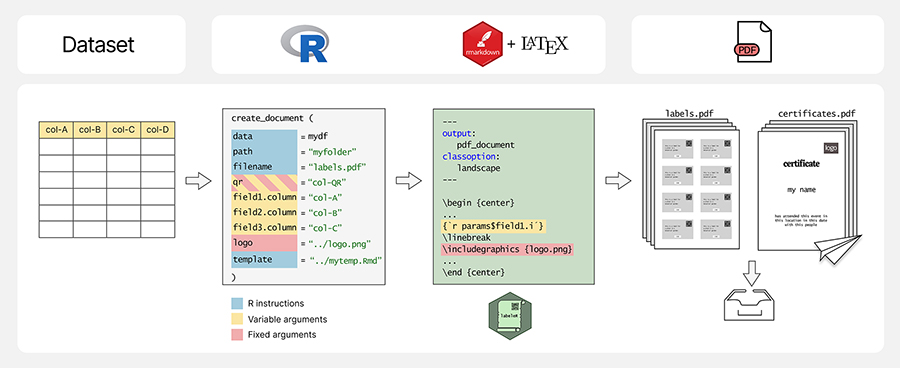
The labeleR package builds upon the RMarkdown ecosystem (Allaire et al. 2024) to generate PDF documents from a tidy data frame in R (Fig. 1). labeleR functions include three types of arguments: (1) R instructions, such as the data object, paths and file name of the rendered document; (2) “fixed” arguments, text that remains constant across output documents (e.g. event name or image path); (3) “variable” arguments, linked to columns in the dataframe, thus changing between documents (e.g. taxonomic names in labels or attendee names in certificates). A QR code can be included either through a fixed argument or a variable argument, without the need for external software, only by providing the link. Users can also edit and adapt the default RMarkdown templates (such as fixed text, font size or face, order in which fields appear, image size and position…) provided by the package for their own purposes. Details on template customization, among other common issues, are detailed in the package website’s FAQ section.


labeleR package workflow. Information stored in a dataset passes through an R function into a parameterized R Markdown file using LaTeX syntax and is then rendered as PDF. labeleR functions accept three argument types: R instructions which specify the dataset, paths to images or the addition of custom templates (in blue); fixed arguments, such as titles or subtitles (in red), and variable arguments, linked to columns of the dataset (in yellow). Users work directly on R to introduce the parameters, while labeleR works in the background with markdown and LaTeX to produce the results. The final output is a PDF document that can be automatically emailed to participants

Figure 1. labeleR package workflow. Information stored in a dataset passes through an R function into a parameterized R Markdown file using LaTeX syntax and is then rendered as PDF. labeleR functions accept three argument types: R instructions which specify the dataset, paths to images or the addition of custom templates (in blue); fixed arguments, such as titles or subtitles (in red), and variable arguments, linked to columns of the dataset (in yellow). Users work directly on R to introduce the parameters, while labeleR works in the background with markdown and LaTeX to produce the results. The final output is a PDF document that can be automatically emailed to participants.

Figura 1. Flujo de trabajo del paquete labeleR. La información contenida en una base de datos pasa a través de una función de R a un documento de R markdown parametrizado, utilizando la sintaxis de LaTeX, y luego es renderizado como un documento PDF. Las funciones de labeleR tienen tres tipos de argumentos: instrucciones de R para especificar por ejemplo la base de datos, los directorios a las imágenes o la incorporación de plantillas personalizables (en azul); argumentos fijos, como los títulos y subtítulos (en rojo), y otros argumentos variables, ligados a columnas de la base de datos (en amarillo). Los/las usuarios/as trabajan directamente con R para introducir los parámetros, mientras que labeleR opera por detrás con markdown y LaTeX para producir los resultados. El producto final es un documento de PDF que puede enviarse directamente a los participantes.

Types of documents that can be generated with labeleR

Labels for collections

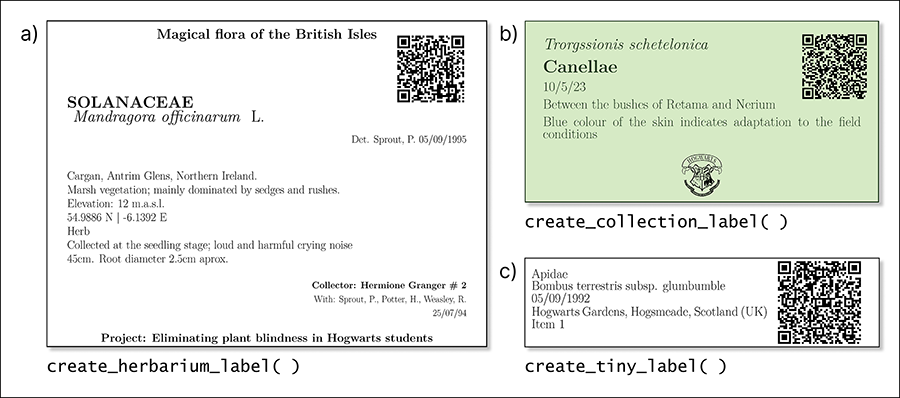
Appropriate labelling of samples is a fundamental step of the scientific process (i.e., labelling test tubes in laboratories, storing animal or plant materials or displaying collections in museums or botanical gardens). A user-friendly bulk rendering tool is vital for efficiently producing crafted, uniform labels in a reproducible manner. We present three label types: “herbarium” (most complex), “collection” (most aesthetic) and “tinylabels” (compact and simplified, for example, for insect collections or lab tubes) (Fig. 2). These labels can include QR codes (e.g. links to websites, images, or identification codes) without additional tools, making it easy to quickly access and link to external information.


Examples of the outcomes from each label-related function in labeleR. a) Herbarium label: for stored plant vouchers; includes fixed fields (title, subtitle) and variable fields (e.g. taxon, date, coordinates, elevation). The family field is by default capitalized and bold, and species name italic. Size: 4 labels/page. b) Collection label: includes variable fields (first field in italics, second in bold), a customizable logo, font and background and text colors. Size: 8/page. c) Tinylabel: a simplified collection label with five fields. Size: 16/page. All three functions can include an optional QR code

Figure 2. Examples of the outcomes from each label-related function in labeleR. a) Herbarium label: for stored plant vouchers; includes fixed fields (title, subtitle) and variable fields (e.g. taxon, date, coordinates, elevation). The family field is by default capitalized and bold, and species name italic. Size: 4 labels/page. b) Collection label: includes variable fields (first field in italics, second in bold), a customizable logo, font and background and text colors. Size: 8/page. c) Tinylabel: a simplified collection label with five fields. Size: 16/page. All three functions can include an optional QR code.

Figura 2. Ejemplos de salida de las funciones relacionadas con etiquetas en labeleR. a) etiquetas de herbario: para pliegos de herbario se incluyen campos fijos (título y subtítulo) y campos variables por cada especímen (e.g. taxón, fecha, coordenadas, elevación). El campo de la familia es por defecto en mayúsculas y negrita, mientras que la especie aparece en cursiva. Tamaño: 4 etiquetas/página. b) Etiqueta de colección: incluye campos variables (el primero en cursiva, el segundo en negrita), y otros modificables como el logo, la fuente y los colores de fondo y de texto. Tamaño: 8/página. c) Tinylabel: es una etiqueta de colección simplificada con solo cinco campos. Tamaño: 16/página. En las tres funciones se puede incluir un QR.

Documents for scientific events

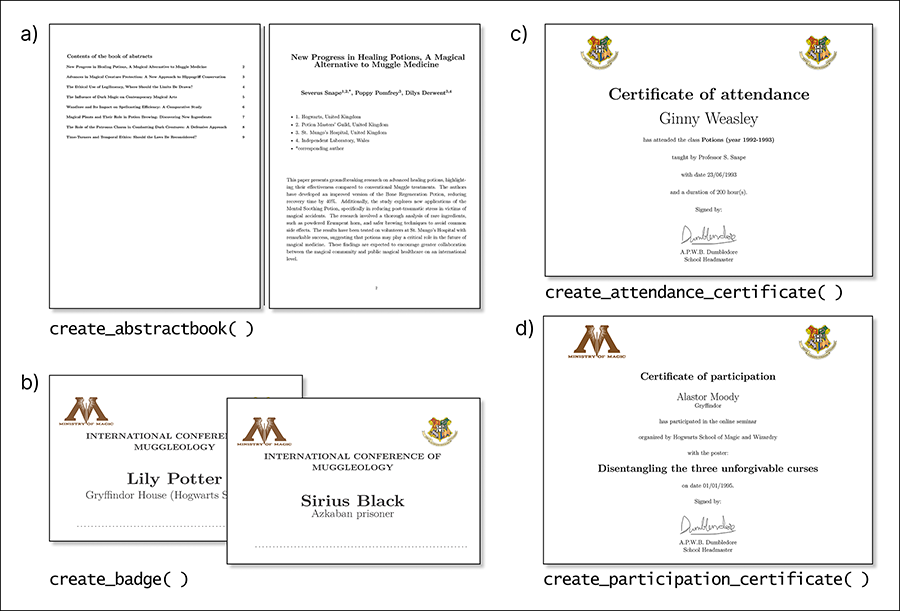
Scientific events often host a high number of participants, and require the creation of identification badges, abstract books and certificates for attendees and participants (Fig. 3). With labeleR, templates and code can be customized according to the event, and bulk rendering significantly decreases the amount of time invested in the creation of such materials. Manually delivering attendance and participation certificates is highly time-consuming, but labeleR functions allow users to automatically send individual documents to email addresses stored in a column.
Examples of outcomes from each event-related function in labeleR. a) Abstract book: this function creates a document with pages with the title, authors, affiliations and abstract (variable fields) and can include a table of contents and front page. b) Badges: they include the name and affiliation of each participant, a fixed field for the title, the option to add two images on top, and a dashed line at the bottom for additional hand-written information. c) Attendance certificate: attendee name is a variable field, while event name, signer, and date are fixed fields. d) Participation certificate: includes the participant name, affiliation and title of the communication, plus several fixed fields. Both certificate functions allow two images on top, a signature at the bottom, and offer Spanish and English templates.

Figure 3. Examples of outcomes from each event-related function in labeleR. a) Abstract book: this function creates a document with pages with the title, authors, affiliations and abstract (variable fields) and can include a table of contents and front page. b) Badges: they include the name and affiliation of each participant, a fixed field for the title, the option to add two images on top, and a dashed line at the bottom for additional hand-written information. c) Attendance certificate: attendee name is a variable field, while event name, signer, and date are fixed fields. d) Participation certificate: includes the participant name, affiliation and title of the communication, plus several fixed fields. Both certificate functions allow two images on top, a signature at the bottom, and offer Spanish and English templates.

Figura 3. Ejemplos de los resultados de cada función relacionada con eventos en labeleR. a) Libro de resúmenes: esta función crea un documento con páginas que incluyen el título, los autores, las afiliaciones y el resumen (campos variables), y además se puede incluir un índice y una portada. b) Credenciales: éstas incluyen el nombre y la afiliación de cada asistente, un campo fijo para el título, la opción de añadir dos imágenes en la parte superior y una línea discontinua en la parte inferior para información adicional que se escriba a mano. c) Certificado de asistencia: incluye el nombre del asistente como campo variable, mientras que el nombre del evento, la firma y la fecha son campos fijos. d) Certificado de participación: incluye el nombre del participante, su afiliación y el título de la comunicación, además de varios campos fijos. Ambas funciones de certificado permiten dos imágenes en la parte superior, una firma en la parte inferior y ofrecen plantillas en español e inglés.

Further applications

The labeleR philosophy is quite simple: creating multiple documents with a common design from a dataset containing the required information. It offers a modular structure that allows for customization and extension for new applications. For instance, the newly added create_multichoice( ) function generates multichoice tests randomizing the order of questions and possible answers from a table including a set of questions. New developments will happen in the GitHub repository (https://github.com/EcologyR/labeleR) and eventually pushed to CRAN.

Authors' Contribution

All authors have collaborated through the process of conceptualization, software development and manuscript writing, reviewing and editing. F.R.S. was responsible for founding during the development of the main steps of the software.

Financing, required permits, potential conflicts of interest and acknowledgments

This package has been developed collaboratively between Sevilla and Madrid, with continuous feedback from colleagues in both locations. We acknowledge their input, support and collaboration. We are especially grateful to Manuel Molina for his ideas at labeleR initial stages. We would like to emphasize that the original idea has been built horizontally among early career researchers. Our work has been possible thanks to the support of the institutions and projects that employ us, and especially by the software-developing workshop (Cádiz, La Muela, 2023) organized by AEET and funded by US-1381388 grant from Universidad de Sevilla/Junta de Andalucía/FEDER-UE.

J.G.A. was supported by Next Generation EU Investigo contract (URJC-AI-17) and ANTENNA Biodiversa+ and European Commission (PCI2023-146022-2) postdoctoral contract. J.M.M. was supported by the Comunidad de Madrid and Universidad Autónoma de Madrid doctoral grant PEJ-2020-AI/AMB-17551 and research assistant contract PIPF-2022/ECO-24251. F.R.S. was supported by VI PPIT-US and grants US-1381388 from Universidad de Sevilla/Junta de Andalucía/FEDER-UE and CNS2022-135839 funded by MICIU/AEI/10.13039/501100011033 and by European Union NextGenerationEU/PRTR. I.R.G. was supported by a doctoral grant at Universidad Autónoma de Madrid and a postdoctoral position at Universidad de Sevilla (CNS2022-135839).

The authors declare no conflicts of interest.

This note has been reviewed through an open and collaborative process available at: https://github.com/ecoinfAEET/Notas_Ecosistemas/issues/60. We would like to thank David García-Callejas and Verónica Cruz-Alonso for their helpful comments and suggestions.

References

Allaire, J., Xie, Y., Dervieux, C., McPherson, J., Luraschi, J., Ushey, K., Atkins, A., et al. 2024. Rmarkdown: Dynamic documents for r. Retrieved from https://github.com/rstudio/rmarkdown

Banasiak, G., Charchut, B., Gould, M., Kaliszewski, B., Bialek, Q.M. 2022. EntomoLabels v8.3.01. Retrieved from https://labels.entomo.pl/

Lafferty, D. 2025. LichenLabler v1.9.0.0. Retrieved from https://help.lichenportal.org/index.php/en/resources/printing-labels/

Pando, F., Lujano, C., Cezón, K. 2019. Elysia: Programa de gestión de colecciones de biodiversidad (v.2.0). Digital.CSIC. doi:10.20350/DIGITALCSIC/14520

Zhang, J., Zhu, H., Liu, J., Fischer, G.A. 2016. Principles behind designing herbarium specimen labels and the R package ’herblabel’. Biodiversity Science 24(12), 1345–1352.